Showing posts with label vintage. Show all posts

23 January 2019

Review: Omron 88M


Omron 88M
I wish I could own every calculator ever. I'd love to be able to review all of them and maybe make the world a better place. But sadly that is probably an impossible task because my home is small and I'm not rich. I have to be selective when calculator shopping now, so that means purchasing devices that stand out in some way. I've got plenty of boring calculators in my collection already.

The Omron 88M came from Japan way back in 1975. It runs on two AA batteries to power its green LED display. It has fairly basic functionality, with a floating point switch that allows the user to quickly and easily switch to financial calculations or avoid decimals completely.

I would never have guessed that this device was released in 1975. If I had to guess, I would have assumed early to mid 1980s, but that's when the LCD display became popular. This device looks and feels like something from an alternate timeline because I've never seen anything quite like it.

The peculiar design makes it fit comfortably in the palm of a hand and reminds me of those scanning devices from Star Trek. I wouldn't be surprised if the design of the 88M was inspired by the original series. By placing the batteries at the bottom, this device is perfectly weighted and clearly designed to be carried around.

The rough black faceplate was an odd but not unwelcome choice. It makes the calculator look and feel rugged, like something designed to be taken on an adventure. That may explain the keychain attachment, if that's what that is.

Each button sticks out prominently and is easy to press, with instantaneous response on the display. This is an easy device to use one-handed, and fits nicely in a pocket thanks to the strange profile.

Functionally, the 88M is nothing special. It works great, but I could say that about many other devices. It's the strange design that made me want this calculator. I found it on Ebay for about $9.

Back, batteries removed.
Faceplate and backplate separated.
Electronic components separated.
Face plate internals.

Some buttons removed. They look like buttons!


21 January 2019

Review: TI-55


I had this review planned for the day after Christmas, but due to my hiatus, it has been delayed until today. But hey, Christmas starts earlier every year, so why not start in January?

TI-55.
When I ask people about calculators they remember fondly, almost every one of them begin with the letters "TI". Texas Instruments has been designing and refining calculators since 1973, and even in their early days they were absolutely killing it. Vintage TI devices have become collectibles for people like myself while newer devices still reign supreme in various markets.

The TI-55 was released in 1977, back when it was still cool to use LEDs. Later variants of the TI-55 used boring LCD displays. This was probably to preserve battery life, but I'll take a gorgeous display over longevity any day.

Speaking of batteries, the TI-55 had its own rechargeable battery pack. This might seem great until you remember this was way back in the 70s, before lithium ion batteries were a thing. Because of this, no stock TI-55 currently works today. Thankfully, this battery pack is fairly easy to remove and can be replaced with a standard 9 volt battery. The video review goes into a bit more detail about this, and there are guides online that explain why this works. It's just awesome that this calculator can be made to work these days.

Aside from the outstanding display, the TI-55 has a great color scheme and overall design. Sitting at a desk and looking down at it, you can see that this was designed to be viewed from an angle. This makes it ideal for school work, especially since it's fairly weighty and has rubber feet to keep it still on a flat surface. However, when viewed from directly above, the display is blocked. This may have been to prevent onlookers from seeing operations. Great care was taken in this calculator's design.
Slightly different angle shows display obscured.
Of course, this is The Calculator Review, so you know I'm going to talk about the button feel. Considering this device could technically be considered a pocket calculator, I am blown away by how amazing these buttons feel. They're clicky and responsive, and perfectly debounced to prevent accidental double-presses. I have no idea why Texas Instruments didn't choose to stick with this button design with later models because it's incredible.

It's a shame, really, that the LCD has become so ubiquitous in pocket calculators. From a technical perspective, it makes perfect sense, as it paved the way for solar and dual powered devices. But from an aesthetic perspective, it's disappointing. The TI-55 is a marvel of engineering and design. It looks beautiful in my collection.

Back of calculator.
Original battery compartment disassembled. 
Each button was taken out to be cleaned. This was a huge pain to put back together.
Calculator completely disassembled.
Foam removed. It crumbled at the slightest touch, so it couldn't be reinstalled.
Duct tape used in place of the foam. Slightly alters the feel of the buttons, but still works just fine.
Red goes to black and black goes to red. It's annoying, but that's how this calculator does it.
New 9 volt battery adapter installed.
Electrical tape used to hold things in place.
Testing the new battery setup to make sure everything's working just fine.
The battery is loose without the cover, but with the cover it's held comfortably in place.
Complete calculator with its leather case.


24 December 2018

Review: Sharp EL-8141


Today is Christmas Eve, which means we're only fourteen days late for Hanukkah! But not to worry, because it's only 311 days until Halloween! To t̶a̶k̶e̶ ̶a̶d̶v̶a̶n̶t̶a̶g̶e̶ ̶o̶f̶ celebrate the holidays, I've got a special calculator to share with you and review.
Sharp EL-8141.
The Sharp EL-8141 is tiny. It's about the size of a credit card. Even in its leather case, it still fits comfortably in my wallet. Credit card-sized calculators are common these days, but the EL-8141 was released around 1979 and looks better than the devices people hand out for free.

It also feels better than any free promotional calculator. It feels like a solid block of metal that won't bend without a significant amount of effort. The buttons are flat and have no tactile feedback, but surprisingly satisfying to use. Digits display effortlessly on the LCD screen and the calculator has an optional beep to indicate a button has been pressed.

Back of calculator.
I purchased this calculator specifically because of the musical note button. I thought this was going to be a musical calculator similar to the Toysmith Rock On! Drumkit Calculator. Sadly, this is not the case. That button only turns on or mutes the beeping noises whenever buttons are pressed. Still, it provides some unique functionality you don't always see in a device, especially one this old and this small.

The one notable flaw with the device is its use of two LR1120 batteries. The entire back of the calculator must be removed via a single screw to access the battery compartment, so this probably isn't the best one to take into a situation that requires reliable mathematical operations.

With its sturdy leather case and sleek overall appearance, the EL-8141 is a must-have device for any calculator enthusiast. As previous reviews have suggested, Sharp tends to nail their designs and I've been happy with every device I've looked at so far.

This Sharp EL-8141 was found on Ebay for about $11.


Internals with batteries removed.

07 December 2018

Review: Radio Shack EC-21


Happy Friday! Today is another Facebook review day, and since my reviews there got better, it means less work for me! I mean, I still did the work, but I don't have to do it now, and present me is happy about that.

Once again, the context of this Facebook review has been lost a bit, but I'm going to leave it as it was.
Radio Shack EC-21.
Eventually, I knew I was going to have to repeat companies with these reviews. I wanted to put it off for as long as possible, but then I realized if I kept doing that, I'd just be reviewing the same three companies' calculators for weeks. So this is my first repeat company, but I made sure to pick something interesting to distract from that.

The appropriately named Radio Shack EC-21 is more than just a calculator. If you've already looked at the images, this build up is pointless, but if you haven't, then you'll be stunned when you learn that this is also a gaming machine! The EC-21 not only handles basic calculations, but can also play rounds of Blackjack.

Fancy leather cover.
Before I get into the game play of the Blackjack, I want to give credit to the construction of this calculator. It feels like a solid block of aluminum- sturdy, but lightweight. The buttons are clicky and responsive, and don't have that remote-control squishy feel most calculators tend to have.

To play, simply slide the left slider to GAME and 0 will begin blinking. It's asking you to place a bet. You can bet however much you want, so I like to pretend I'm rich and bet $5. Press the bet button, and you'll be dealt cards represented by a single digit. It plays like any electronic game of Blackjack, but can be a nice distraction from a long day of math homework.

The one flaw that I didn't notice until I spent a few minutes with regular calculator use is the positioning of the equals button. Most calculators place this in the bottom right, but for some reason Radio Shack put it at the top, and not even in the right-most position. I found myself pressing the ( ) button, which is useless for most basic operations, and I had to clear the screen to try again.


The EC-21 was built in 1978 and runs on three AAA batteries. It comes with a nice leather case that also houses the manual. Nothing about it is complicated enough to warrant the need for the manual, but it's a nice touch. With its brushed aluminum exterior, It's a beautiful calculator, even without the case. I found it at Goodwill for probably $3.
Back, outside cover.

Back, batteries removed.

Front and back components separated.

Motherboard partially removed. Wires left intact.
Better view of motherboard.


View beneath motherboard.

To view the manual, click here.


05 December 2018

Review: Produx Original


I haven't said this for a few reviews, so it's time I say it again: thank you so much to everyone following these calculator reviews. I've loved the pictures and comments people have sent me. If you have a calculator you think is interesting, please send me a tweet or something. I'm also interested in any other vintage technology you'd like to share, so send me pictures of that stuff too. In the near future, I'd like to create a second blog specifically for old, forgotten technology, but calculators will remain my priority, of course.

Produx Original Calculator.
The Produx Original comes from West Germany some time between 1940 and 1960. This is just one of many mathematical devices from Produx, and since it doesn't seem like the company is around anymore, finding details is challenging.

Calling this device a machine is a stretch because the only moving parts are controlled entirely by using the stylus. I can't get inside the Produx Original without destroying it, but I can safely assume that there are no gears, levers, or mechanical mechanisms inside other than the sliding numerical parts.

So if everything's done manually, you'd think that means this is no less difficult than doing adding or subtracting by hand. And you'd be very wrong. With only a few minutes of practice, I was able to figure out how to quickly add and subtract large numbers without the aid of a manual or guide.

Green leather case for calculator and stylus.
The video review shows the process to perform operations, but it's little more than a matter of inputting an initial number, then inputting a second number that you want to add or subtract. For addition, you use the lower portion of the device, and for subtraction, use the upper. To clear the numbers back to zero, you simply pull up on the handle at the top of the calculator. There are a few tricks that might take a minute or so to learn, but overall the Produx Original is very intuitive.

Considering this device is over fifty years old, it's in fantastic condition. Even the leather case looks great. This is a calculator that was designed to last as it's made entirely of metal. It's definitely not cheap metal either because it's very difficult to bend (not that I tried that hard).

It's comfortable to hold and looks stunning. Despite it clearly looking like something decades old, there's hardly a scuff on the front of it. The previous owner(s) must have taken good care of this calculator and I hope they can rest easy knowing it's in good hands now.

I purchased this Produx on Ebay for $11.
Back of Produx Original.

Reset handle in use. Sets all values to 0.

26 November 2018

Review: Texas Instruments 1000


So begins another week of calculator reviews. Giving myself more time for each review has allowed me to improve the videos and the posts, as well as create additional content such as Obsolete Technology and The Calculator Repair. The response I've received for these has been just as positive as the calculator reviews.

Since it's Monday, I also get to pick the Comment of the Week, so here it is:

I didn't get any comments last week...

TI-1000.
Last week I reviewed the APF Mark 65 and mentioned that there were other calculators with a similar aesthetic that were far superior. The one I had in mind was this Texas Instruments 1000 calculator. Personally, I prefer this color scheme as it's more consistent and elegant, but the TI-1000 beats the Mark 65 in several other categories.

I'd like to address the bizarre numbering system Texas Instruments uses for their devices. I don't get it. The TI-1000 is the third generation, starting with the TI-2500 and then the TI-1200. I have no idea why they went backward with the numbers, or why even later models used only two digits. Nothing about it makes any sense.

The TI-1000 doesn't try to impress anyone, but it succeeds in doing so. It features a gorgeous red fluorescent display behind a crisp brushed aluminum face plate. It's a little heavier than it looks, and the device feels very sturdy when held. The functionality is about as basic as you can get with a calculator and yet that somehow makes it even better. The operations work, and that should be all that matters.

Back view.
Well, they mostly work. I've actually purchased two TI-1000s and both of them have had issues. The first one I bought had a messed up display, so I attempted to fix it and found that the ribbon inside was slightly torn. This seemed like an easy fix, but the ribbon was so brittle that my attempt to fix it made it much, much worse. I ended up rendering the device completely useless and disposed of the internals. Later, I bought a second one and this one's display works perfectly. However, it has an annoying habit of inputting a digit twice when a button is pressed once. There may be a way to fix this, but I'd have to get under the buttons and this would mean manipulating the ribbon again, and I just don't trust myself to not screw it up again.

So the TI-1000 does have problems, and for that I can't bring myself to recommend this as more than a display calculator. It looks (and feels) amazing, and it's clear that Texas Instruments put a lot of love into it. But sadly, time has been a brutal enemy to this calculator. The internals have become so frail that it's risky to even take the device apart.

This calculator runs on a single 9 volt battery hidden by a panel that feels just as sturdy as the rest of the device. I found the first one at Goodwill for about $3, then ordered the currently working one on Ebay for $8.


Back view, battery removed.

Back of front plate.

Internal components not removed due to fragility.

23 November 2018

Review: APF Mark 65


It's Friday, so that means another calculator reviewed on Facebook! As always, I will post the original review below this one if you're interested in seeing whether my opinion changed.
APF Mark 65

As my calculator collection has grown and I've taken them apart, cleaned them, and even repaired a few, my tastes in specific features become more refined. Some calculators are absolutely fantastic and others only exist in my collection because I refuse to just throw them away. Then there are the ones like today's calculator. I don't really know what to make of it.

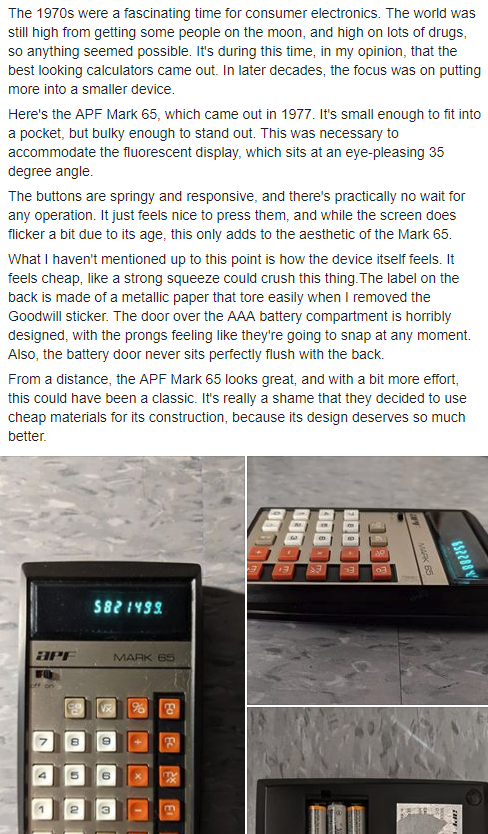
The Al & Phil Friedman (APF) Mark 65 was released no later than 1977, and, like most electronics from that decade, looks like it was made in that decade. While Wednesday's HP 10bII review mentioned it went for this aesthetic, the Mark 65 didn't even have to try. It just is 1970s.

I mean, look at it. The brushed aluminum face plate, the weird combination of white, orange, and not-so-brown buttons, and the care-free use of a different font for everything- it was a different time, man.

But also check out that bulk. You just don't see that in a modern calculator. This was to accommodate a beautiful-as-always teal-greenish-blue fluorescent display and thick pinches of solder all over the main board. And of course this runs on three AAA batteries and I should feel lucky it doesn't require more.

I want to love this calculator, I really do. But sadly, it only looks great. It feels miserable. Every component of the device is made of cheap material and it feels way lighter than it looks. The buttons and switch feel fine, but without a weighty feel to the rest of it, I'm just disappointed.
Cheap materials are easily ruined.

The cheap plastic is most evident in the battery cover. I feel like I'm going to snap it in half every time I try to put it back in place. This plastic is the type that will break into sharp pieces if dropped onto a hard surface. It's a shame, really.

This is the kind of calculator that looks great on display next to other vintage devices. There's no doubt it belongs among them. But my dream calculator museum would place this calculator behind glass not to protect it from patrons, but to protect the patrons from knowing how crappy this thing actually feels.

I found this calculator at Goodwill for like $3.99. As someone who has had hands-on experience with many devices, I can assure you that the APF Mark 65 is not worth seeking out. If you're sold entirely on how it looks, just wait for an upcoming review of a similar, but far superior device.

Internal Components

I wanted to completely disassemble this device, but screws beneath soldered components prevented this.

Here's the original Facebook review: