I had this review planned for the day after Christmas, but due to my hiatus, it has been delayed until today. But hey, Christmas starts earlier every year, so why not start in January?
TI-55.
When I ask people about calculators they remember fondly, almost every one of them begin with the letters "TI". Texas Instruments has been designing and refining calculators since 1973, and even in their early days they were absolutely killing it. Vintage TI devices have become collectibles for people like myself while newer devices still reign supreme in various markets.
The TI-55 was released in 1977, back when it was still cool to use LEDs. Later variants of the TI-55 used boring LCD displays. This was probably to preserve battery life, but I'll take a gorgeous display over longevity any day.
Speaking of batteries, the TI-55 had its own rechargeable battery pack. This might seem great until you remember this was way back in the 70s, before lithium ion batteries were a thing. Because of this, no stock TI-55 currently works today. Thankfully, this battery pack is fairly easy to remove and can be replaced with a standard 9 volt battery. The video review goes into a bit more detail about this, and there are guides online that explain why this works. It's just awesome that this calculator can be made to work these days.
Aside from the outstanding display, the TI-55 has a great color scheme and overall design. Sitting at a desk and looking down at it, you can see that this was designed to be viewed from an angle. This makes it ideal for school work, especially since it's fairly weighty and has rubber feet to keep it still on a flat surface. However, when viewed from directly above, the display is blocked. This may have been to prevent onlookers from seeing operations. Great care was taken in this calculator's design.
Slightly different angle shows display obscured.
Of course, this is The Calculator Review, so you know I'm going to talk about the button feel. Considering this device could technically be considered a pocket calculator, I am blown away by how amazing these buttons feel. They're clicky and responsive, and perfectly debounced to prevent accidental double-presses. I have no idea why Texas Instruments didn't choose to stick with this button design with later models because it's incredible.
It's a shame, really, that the LCD has become so ubiquitous in pocket calculators. From a technical perspective, it makes perfect sense, as it paved the way for solar and dual powered devices. But from an aesthetic perspective, it's disappointing. The TI-55 is a marvel of engineering and design. It looks beautiful in my collection.
Back of calculator.
Original battery compartment disassembled.
Each button was taken out to be cleaned. This was a huge pain to put back together.
Calculator completely disassembled.
Foam removed. It crumbled at the slightest touch, so it couldn't be reinstalled.
Duct tape used in place of the foam. Slightly alters the feel of the buttons, but still works just fine.
Red goes to black and black goes to red. It's annoying, but that's how this calculator does it.
New 9 volt battery adapter installed.
Electrical tape used to hold things in place.
Testing the new battery setup to make sure everything's working just fine.
The battery is loose without the cover, but with the cover it's held comfortably in place.
Like any vintage electronics collector, I love retrobrighting and restoration videos. They are a huge part of what got me into it in the first place. Seeing a device that would normally be thrown into the trash restored to its former glory is extremely satisfying, and a high that I've been chasing for a while. Here are a few of my favorites:
These people are much better than I am at restorations and creating videos, but they have inspired me to be a part of this subculture that tries to keep old electronics working for people to appreciate.
Canon P101-D.
That being said, I have utterly failed to retrobright or restore the Canon P101-D that I recently purchased at Goodwill for $10. When I first laid my eyes on it, I was thrilled to see a device with such a bold orange color. This was the kind of desktop calculator that would turn heads at any cubicle farm. I was going to make other calculator collectors salivate over my unique find. I needed this after learning that a fellow collector owns a Curta.
Proof that I talked to a person.
This was followed up by an image of what the calculator is supposed to look like:
Source: not me.
Needless to say, I was devastated. But I also saw an opportunity to attempt my first retrobright. The video attached to this review shows my process, and I'm trying to get more views, so if you're interested in seeing how that went, check it out. To quickly summarize, it didn't work at all.
The Canon P101-D is a fantastic desktop calculator regardless. It's quite large but doesn't feel like it's wasting space. The numeral and operation buttons all press like mechanical keys with instantaneous responses. The exception is the "paper feed" button, but not at all in a bad way. It has its own sort of deliberate feel when pressed.
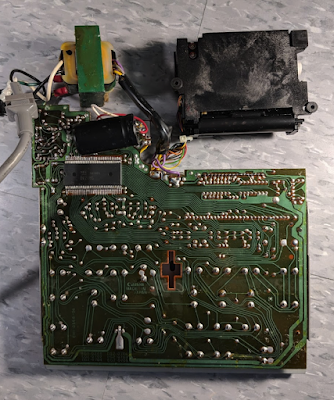
Very sturdy and reliable internal components.
When using the printer, every calculation is loud and mechanical, and it's awesome. It feels like a large cash register when this thing really gets going. It's hard to explain, but while loud and mechanical might seem annoying, it feels more like a reminder that this device will probably continue working forever.
And of course all of this leads up to the absolutely gorgeous green LED display. Even with a cracked display cover (my fault), numbers have never looked better. This is simply a beautiful, solid calculator that I will proudly keep on display.
I'm tempted to leave it in the sun for a bit to even out the discoloration, but there's a possibility I'll be revisiting this device in the future with another retrobrighting attempt.
I have contacted Canon customer support to try to find the release year for this model, but they were unable to provide me with an answer. I've searched around for the answer and have found nothing so far. If you have any information about the release year, please let me know so that I can update this review.
Cracked screen (my fault). Still looks great though.
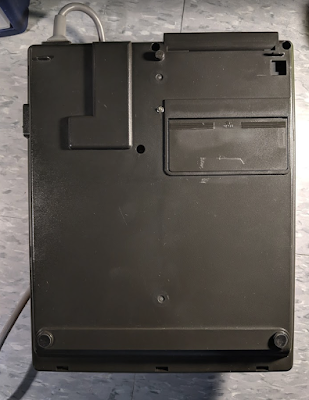
The bottom of the calculator, if you're into that sort of thing.
Bottom of internal components. Excellent materials all around.
Inside view with keys removed.
Every key is made of a nice thick plastic.
View of the LED screen without protective (and broken) cover.